Passport Guide
Apply for new passport or renewal
Ministry of External Affairs
Register & Login
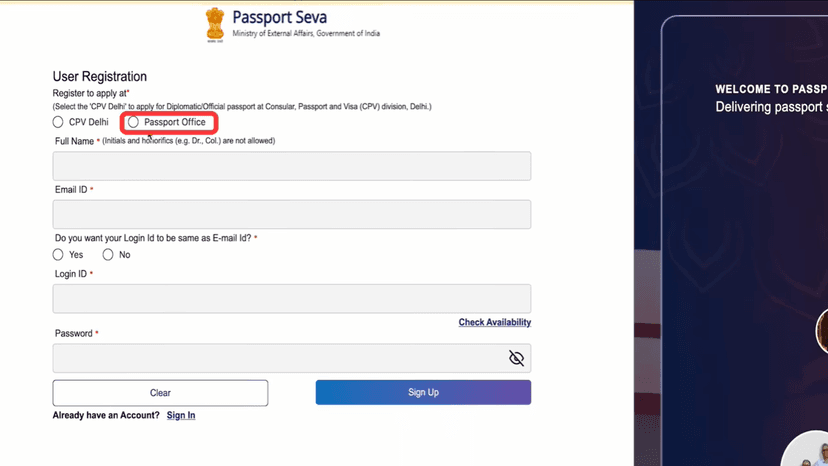
Click Register
Select Passport Office
Enter:
- Full Name
- Email ID
When asked to use Email ID as Login ID:
- Select Yes
- Check Availability
Create an 8-character password
Click Sign Up
Enter the OTP received on your email
Click Complete Sign Up
#Login
Click Login
Enter your Email ID
Enter the password you created
Sign in to continue
Passport Type
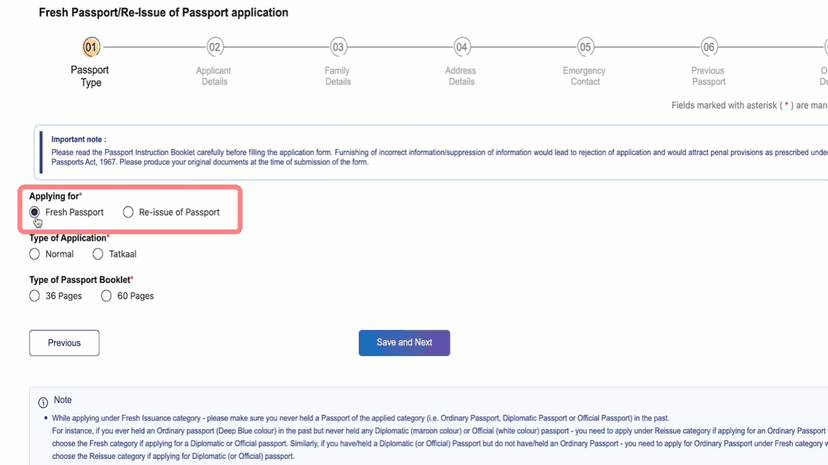
Click Apply for Fresh Passport / Re-issue of Passport
Click Skip for Now
Click Next
#Application Details
Select Fresh Passport
Type of Application
- Select Normal
- Select Tatkal if urgent (higher fee)
Type of Booklet
- Select 36 Pages (standard option)
Click Save & Next to continue
Applicant Details
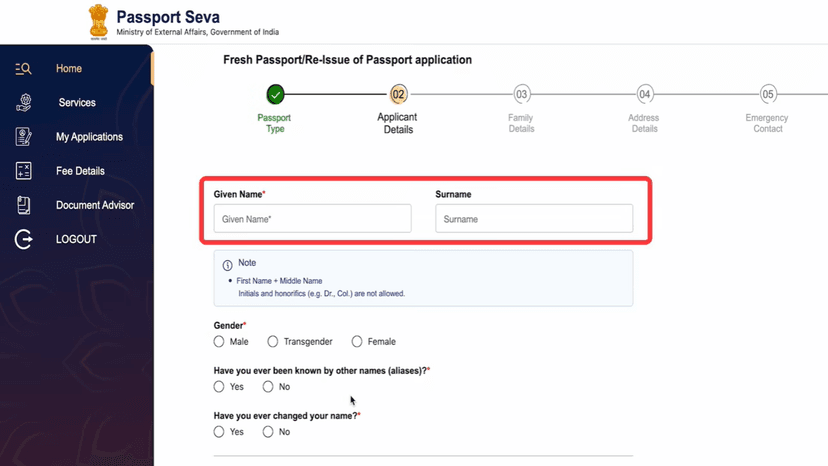
Enter:
- First Name and Surname
- Gender
Select:
- Have you ever been known by another name? Yes / No
- Have you ever changed your name? Yes / No
Enter Date of Birth
Enter Place of Birth
Select:
- Marital Status
- State and District
#Citizenship & Other Details
Citizenship: Select By Birth
Enter PAN Number and Voter ID (if available)
Select:
- Employment Type
- Is any parent (for minors) or spouse a Government Servant? Yes / No
- Educational Qualification
#Non-ECR Category
Select Yes if your education is above 10th
Select No if not
#Final Details
Enter Visible Distinguishing Mark
Enter Aadhaar Number (if available)
Tick I Agree
Click Save & Next
Family Details
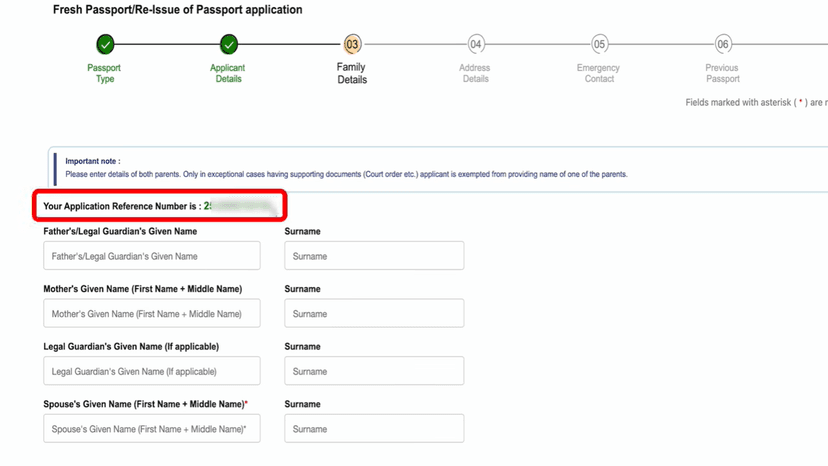
An Application Reference Number will be generated
Enter:
- Father's Name & Surname
- Mother's Name & Surname
- Legal Guardian's Name (if applicable, otherwise leave blank)
- Spouse's Name (if applicable)
Click Save & Next to continue
Address Details
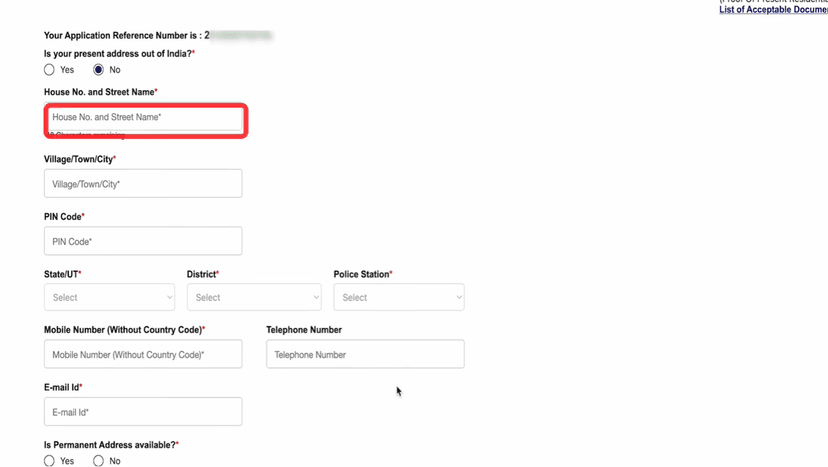
Enter Present Address:
- House Number
- Village / Town / City
- PIN Code
- State and District
- Police Station
Enter:
- Mobile Number (without country code)
- Email ID
#Permanent Address
Select Yes for permanent address available
Select Yes if same as present address
Select No if different and enter details
Click Save & Next to continue
Emergency Contact & Review
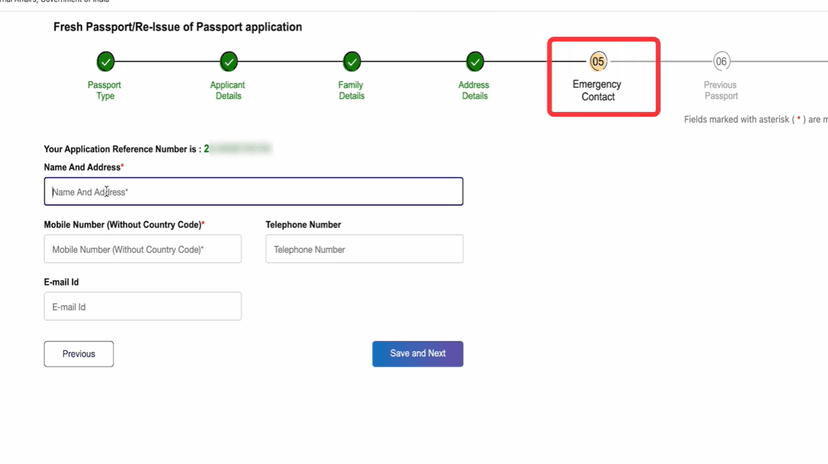
#Emergency Contact
Enter Name and Address (in the same line)
Enter Mobile Number (without country code)
Enter Email ID
Click Save & Next
#Questionnaire
Read the questions carefully
Select Yes or No as applicable
Click Save & Next
Answer the next set of questions:
- Select Yes if applicable
- Select No if not
Click Next
#Review Application
You will see the Passport Application Summary
Verify all details carefully
If anything is incorrect, go back and edit
If everything is correct:
- Tick I Agree
- Click Save & Next
Document Selection & Submit
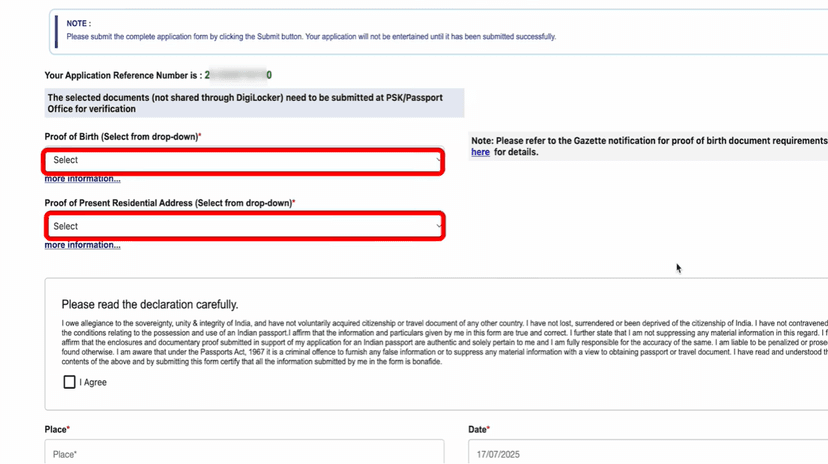
#Select Documents to Submit
Proof of Birth
Proof of Present Address
#For Non-ECR Category
Upload High School Marksheet
Tick I Agree
Enter Place (District)
Click Save & Preview
Check all details carefully
Close the preview
Click Submit
Fee Payment & Appointment
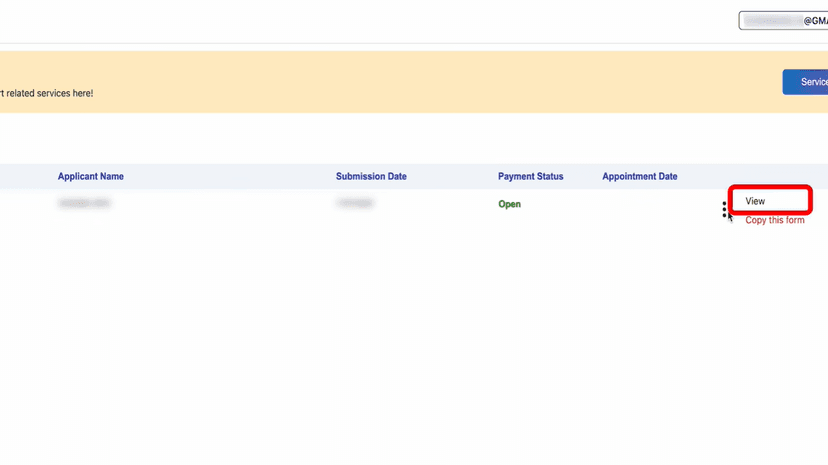
Go to the Home Dashboard
Find your application
Click the three dots (⋮) on the right
Select View
Click Pay & Schedule Appointment
Select your PSK (Passport Seva Kendra)
Choose an Appointment Date
Click Make Payment
Click Pay Now
#Payment
You will be redirected to the SBI Payment Gateway
Select payment mode:
- UPI / Net Banking / Card
Complete the payment
Download & print the Appointment Receipt
#Visit Passport Office
Carry:
- Appointment Receipt
- All original documents selected in the form
At the PSK:
- Photo will be taken
- Fingerprints (biometric) will be captured
#Police Verification & Passport Delivery
Application will go for Police Verification
You can track the status on the portal
Police may contact you in 2–3 days
If not, visit the local police station
Carry copies of your documents
After verification:
- Passport is delivered by post to your address
- Usually within 10–15 days
Done! Form Complete 🎉
Follow all the steps above and your form will be successfully submitted.
Apply Now