Zero Balance Account (Kotak 811) Guide
Open a zero balance savings account with Kotak
Kotak Mahindra Bank
Start Account Opening
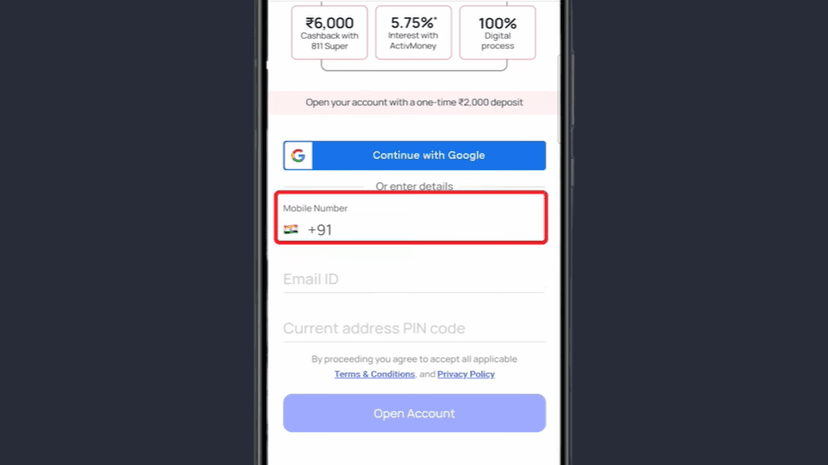
Enter:
- Mobile Number
- Email ID
- Current Address PIN Code
Click Open Account
You will receive an OTP on your email
#Handle PIN Code Error
If you get an error, your PIN code may not be serviceable
Enter the Email OTP
Click Next
#PAN & Aadhaar Verification
Enter:
- PAN Card Number
- Aadhaar Number
Accept Terms & Conditions
Click Proceed to Verify
You will receive an OTP on the mobile number linked with Aadhaar
Enter the OTP
Click Next
Allow Location Access when asked
Personal Details
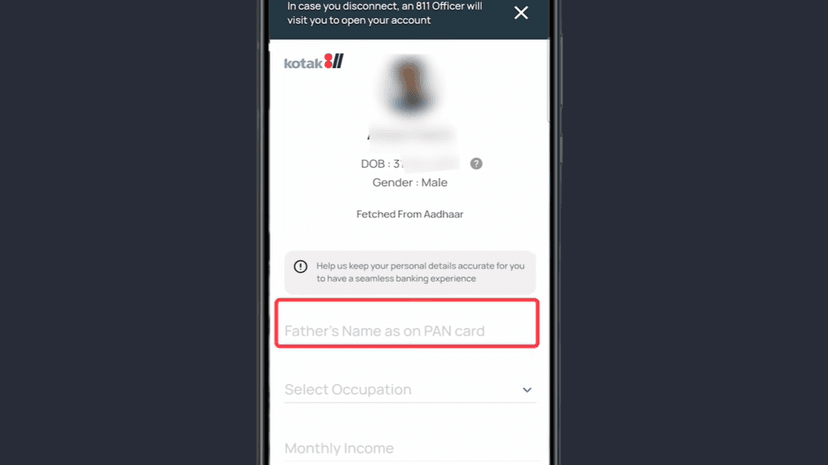
Your Aadhaar details will be shown automatically
👉 Check them once
Enter Father's Name
Select:
- Occupation
- Monthly Income
- Source of Income
- Marital Status
#Mother's Maiden Name
Enter Mother's Maiden Name
Used as a security question
Re-enter the Mother's Maiden Name for confirmation
Click Next to continue
Address & Nominee Details
Your Communication Address (from Aadhaar) will be shown
If it's correct, select Same as Communication Address
If different, enter the address manually
Click Proceed
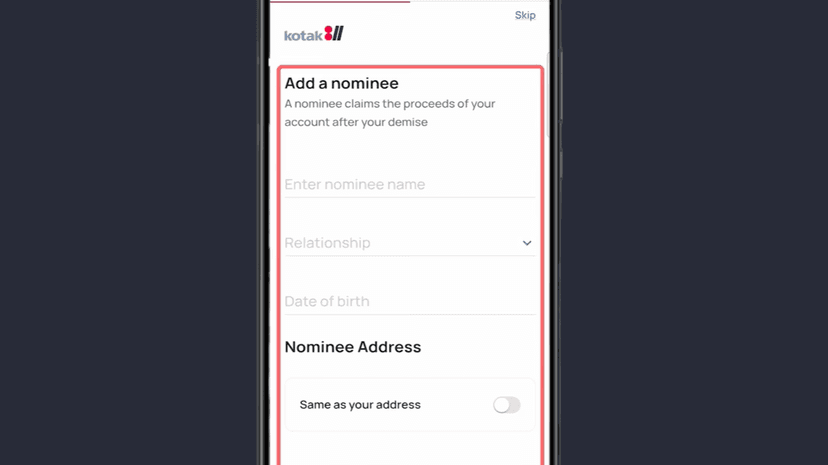
#Nominee Details
Enter Nominee Name
Select Relationship
Enter:
- Date of Birth
- Email ID
- Mobile Number
- Nominee Address
Select Same as Permanent Address if applicable
Otherwise, enter it manually
Accept Terms & Conditions
Click Proceed to continue
Choose Plan, Deposit & Set MPIN
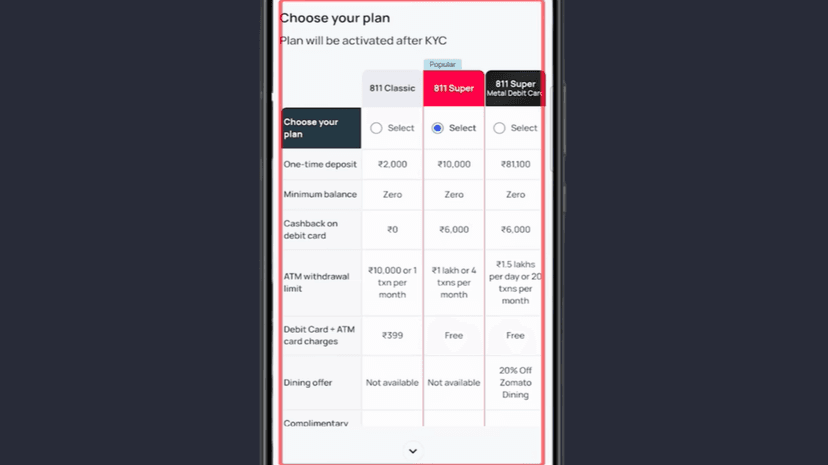
#Choose Your Account Plan
Select the plan based on your needs
#Deposit Amount
Add money using any payment mode
#Set MPIN
Create your MPIN
Re-enter the MPIN to confirm
#Insurance Cover (Optional)
You will see an insurance protection option
Click Enroll Now if you want the cover
Click Continue Without Protection if you don't want it
Complete Full KYC (Video KYC)
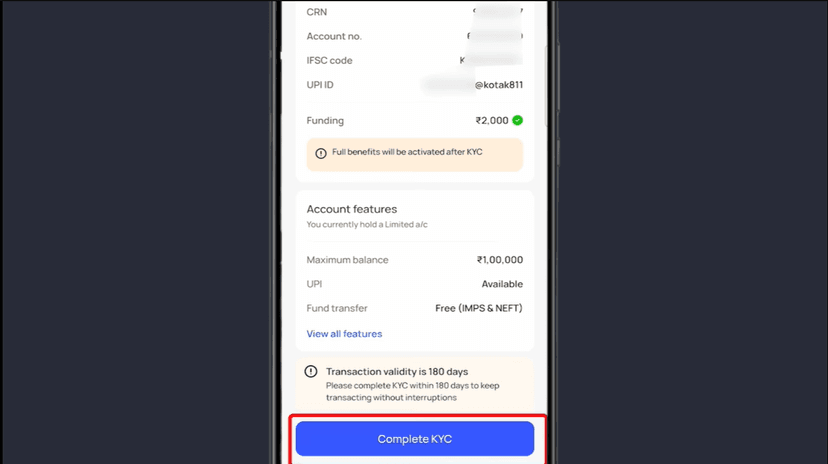
Your account is created, but full KYC is required
Click Complete KYC
#Select Start Video KYC
#If the page doesn't load:
Try:
- Wait for a few minutes, or
- Check WhatsApp for the Video KYC link
#Start Video KYC
Click Go to Video KYC
Select your Communication Address
Click Proceed
Read and accept Terms & Conditions
Click Agree & Proceed
#Upload Required Items
Upload Photo of your physical PAN card
Upload your Selfie
Upload your Signature
If you see an upgrade popup:
Click Continue with your current plan
Allow Location Access
Video Call & Account Activation
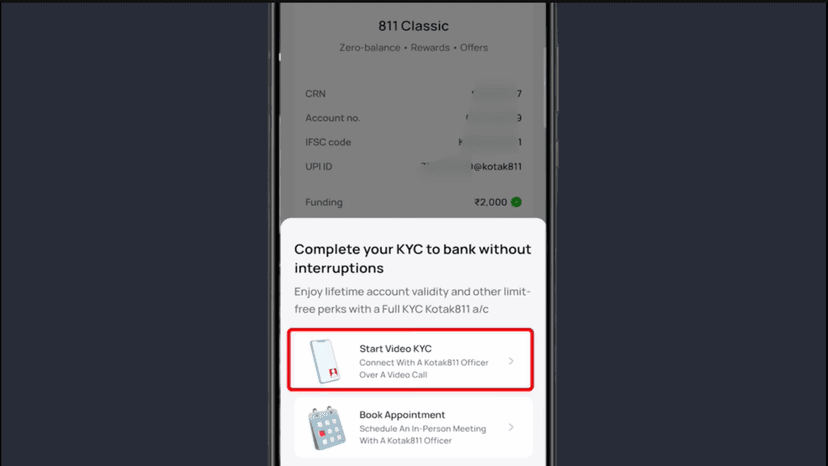
#Video Call with Bank Officer
You will be connected to a bank representative
Answer all questions yourself
You may be asked to:
- Show your physical PAN card
- Do your signature on blank paper
- *(Signature should match PAN card)*
#After KYC Completion
Within 1 month, you will receive:
- Debit Card
- Passbook
- Other account-related documents
#Download & Login
Download the official Kotak Mahindra Bank app
Login using your registered mobile number
Use the MPIN you created
✅ Zero Balance Account opening process is now fully complete
Done! Form Complete 🎉
Follow all the steps above and your form will be successfully submitted.
Apply Now