PAN Card Guide
Apply for new PAN Card or corrections
Income Tax Department
Select Application Type
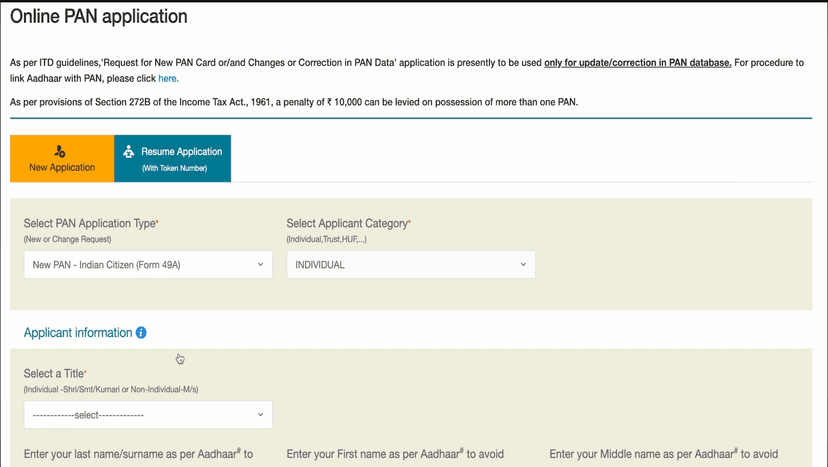
#PAN Application Type
Select NEW PAN – Indian Citizen (Form 49A)
#Already Started?
Select Resume only if you have a Token Number
#Applicant Category
Select INDIVIDUAL
Application Information
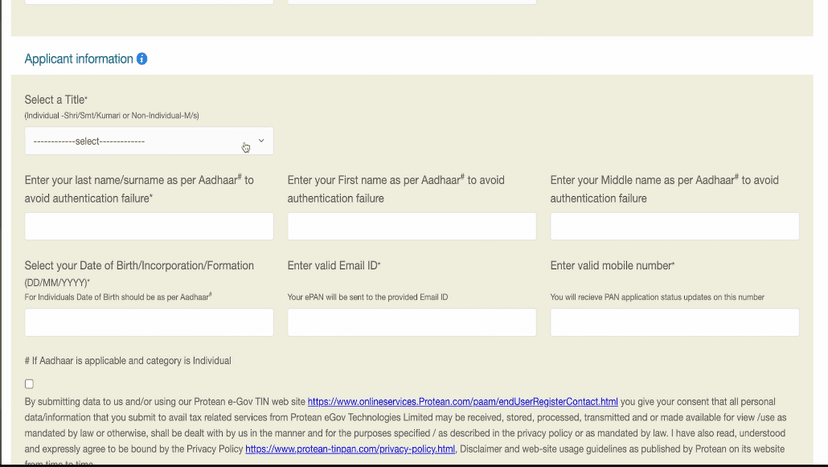
#Select Title
Choose:
- Shri – for male
- Smt – for married female
- Kumari – for unmarried female
#Enter Your Name
Fill all fields:
- Last Name / Surname (Mandatory) – must match Aadhaar
- First Name
- Middle Name (Optional)
#Other Details
Enter Date of Birth
Enter Email ID (e-PAN will be sent here)
Enter Mobile Number (for OTP)
Tick the checkbox to agree
Click Submit
Save Your Token ID
#After Submitting
You will receive a Token ID on screen
Write it down or take a screenshot!
#Continue
Click Continue to proceed
Document Submission Method
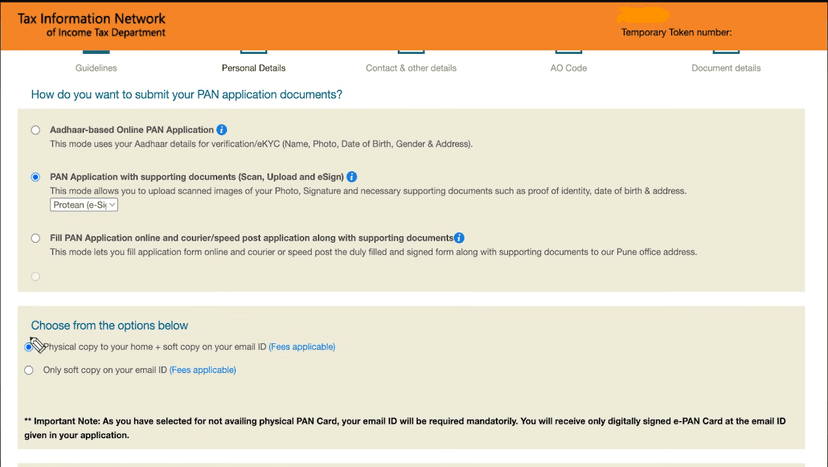
#Option 1: Aadhaar-based
Details verified using Aadhaar
Photo from Aadhaar
#Option 2: Upload Documents (Recommended)
Upload your photo and signature
Upload identity, DOB, and address documents
#Option 3: Send by Courier
Print form and send to PAN office (Pune)
#PAN Delivery Option
Choose:
- Physical PAN + Soft Copy – delivered to address
- Only Soft Copy (Email) – no physical card
More Details
#Aadhaar Details
Enter last 4 digits of your Aadhaar
Name as per Aadhaar must match exactly
#Full Name
Usually auto-filled
Verify and edit if needed
#Other Name
Select Yes if you used another name earlier
Select No if not
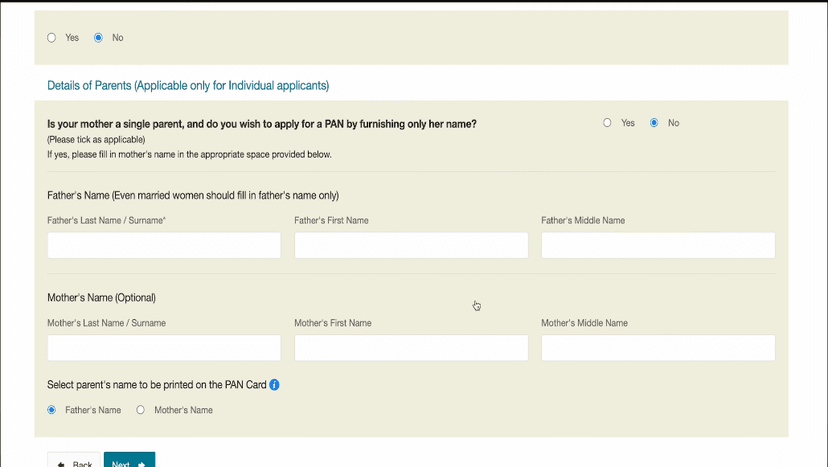
#Parent Details
Enter for both parents:
- Father's Name – Last Name (mandatory), First, Middle
- Mother's Name – Last Name (mandatory), First, Middle
#Name on PAN Card
Select Father's name or Mother's name
Click Next
Contact Details
#Source of Income
Select option matching your profile
#Address for Communication
Select Residence for home delivery
Select Office for office delivery
#Residence Address
Enter as per Aadhaar:
- Flat/Room, Building/Village, Street, Area
- City/District, State, Country, PIN code
#Office Address
Leave blank if selected Residence
#Contact Details
Mobile and email are usually auto-filled
Verify the details
#Representative Assessee
Select Yes if applicant is below 18 years
Select No if 18 or above
Click Next
AO Code
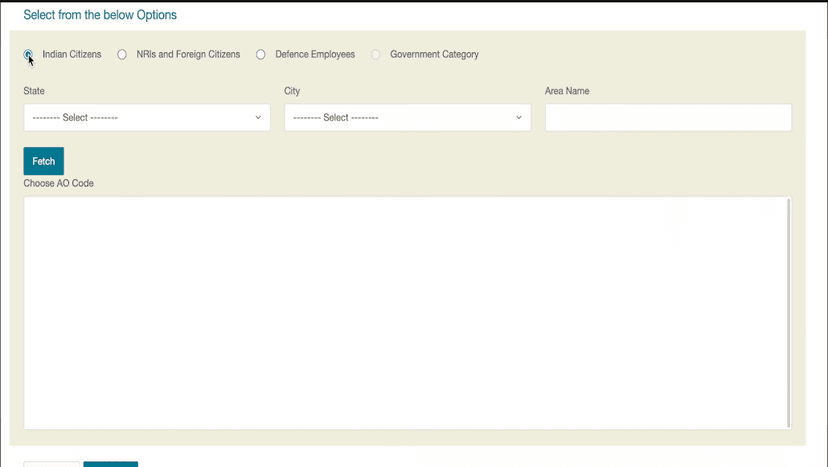
#AO Code Fields
You will see 4 fields:
- Area Code
- AO Type
- Range Code
- AO Number
#How to Fill
Scroll down and select Indian Citizen
Choose your State and City
Click Fetch button
Select the matching option
All 4 fields will be filled automatically
Click Next to continue
Document Upload
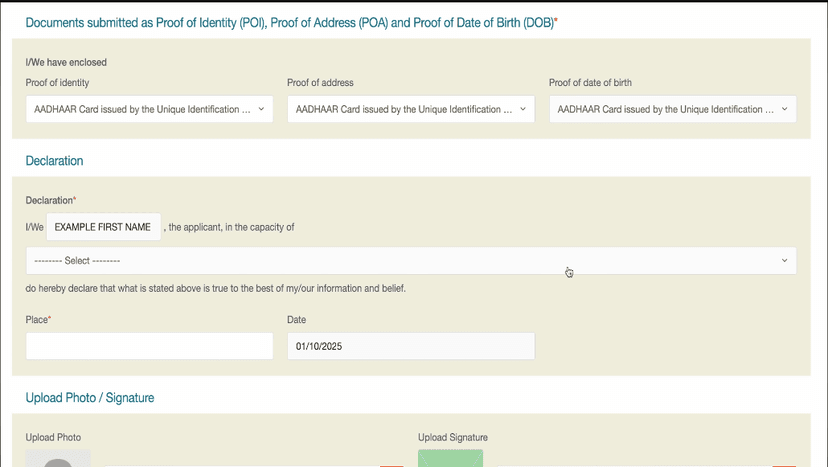
#Proof Documents
Select documents for:
- POI (Proof of Identity)
- POA (Proof of Address)
- DOB (Date of Birth proof)
#Declaration
Name should be auto-filled
Select Himself/Herself if filling for yourself
Select Representative Assessee if for child
Enter Place and Today's Date
#Upload Photo
Upload clear passport-size photo
Max size: 50 KB
#Upload Signature
Max size: 50 KB
Upload only signature (crop extra area)
#Upload Documents
If multiple documents: Click Add Document for each
If only Aadhaar: Upload Aadhaar PDF once
Click Submit
Review & Proceed
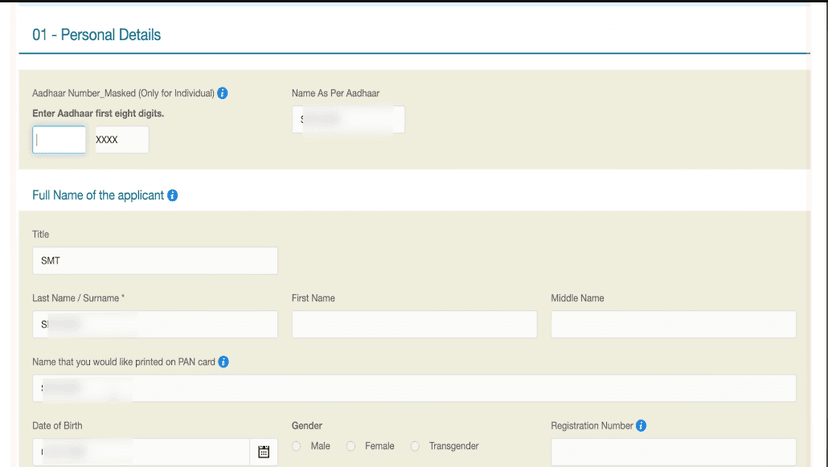
#Summary Page
You will see all filled details
Enter first 8 digits of your Aadhaar
#Verify Details
Check name, DOB, address carefully
If any mistake, go back and correct it
#Proceed
If everything is correct
Scroll down and click Proceed
Payment
#Select Payment Method
Options:
- UPI (recommended - fastest)
- Paytm
- Net Banking
- Debit/Credit Card
#Application Fee
Fee is approximately ₹106
#Complete Payment
Tick Terms & Conditions
Click Proceed to Payment
e-Sign & Download
#e-Sign Process
Click Continue to e-Sign Process
Tick the I hereby checkbox
Enter your Aadhaar number
Click Send OTP
#Verify OTP
Enter OTP received on Aadhaar-linked mobile
Click Verify OTP
#Download Acknowledgement
Download the Acknowledgement PDF
PDF is password-protected
Password = DOB in DDMMYYYY format
#Application Complete
You will receive:
- Complete PAN application form PDF
- Acknowledgement Number (for tracking)
- e-PAN on registered email
- Physical PAN delivered in 15-20 days
Done! Form Complete 🎉
Follow all the steps above and your form will be successfully submitted.
Apply Now