Birth Certificate Guide
Apply for birth certificate online
Government of India
Login & Register
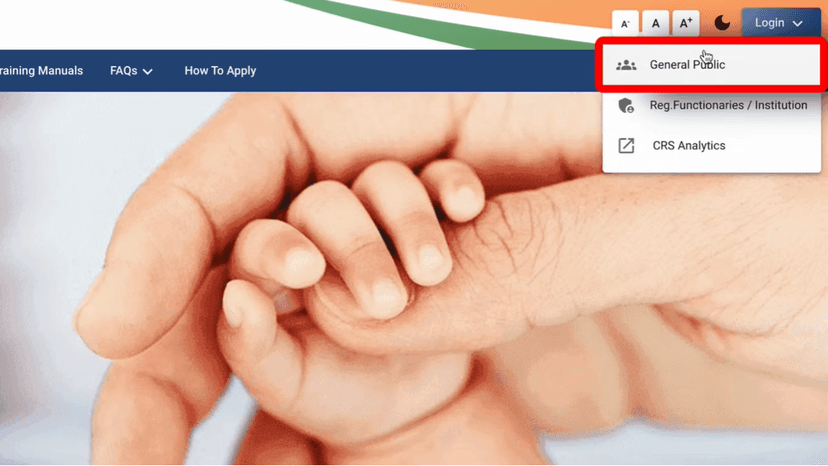
#Open the Portal
Visit dc.crsorgi.gov.in
Click Login
#Select User Type
Select General Public
Click Sign Up to create account
#Registration Details
Enter:
- Full Name
- Gender
- Date of Birth
Click Next
#Address Details
Fill all fields:
- State, District, Sub-District
- Village/Town
- PIN Code
Click Next
#Aadhaar & Nationality
Enter your Aadhaar Number
Select Nationality: Indian
Accept Terms & Conditions
Click Next
#Verify Mobile & Email
Enter Mobile Number and Email ID
Verify using OTP sent to both
Report Birth
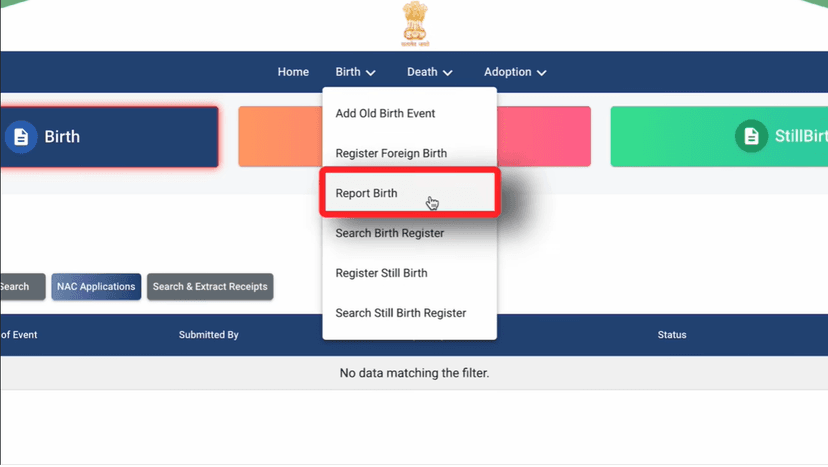
#Login & Navigate
Login using Mobile Number or Email ID
Click on Birth tab
Select Report Birth
#Select State & Language
Select your State
Select preferred Language
#Child's Details
Enter:
- Date of Birth (enter twice)
- Time of Birth
- Gender
- Aadhaar Number (if available)
#Child's Name
Enter the Child's Name
If name not decided, tick the checkbox above
Parents Information
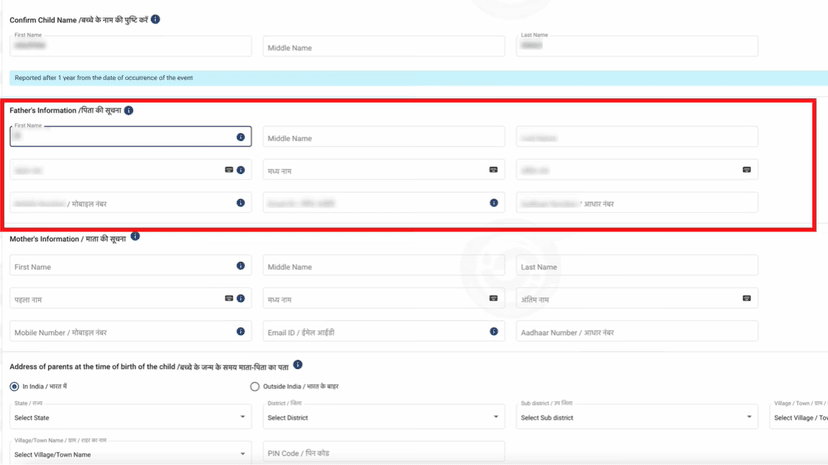
#Father's & Mother's Details
Enter for both parents:
- Full Name
- Mobile Number
- Email ID
- Aadhaar Number
#Address at Time of Birth
Enter parent's address:
- District and Sub-District
- Village/Town
- Street Name
- PIN Code
#Permanent Address
Select Yes if same as above
Select No if different (enter new address)
#Place of Birth
Select place:
- Home
- Hospital
- Other
Enter details of selected place
#Registration Unit
Select your Registration Unit
Select Hospital if applicable
Click Save Draft
Click Next
Statistical Information
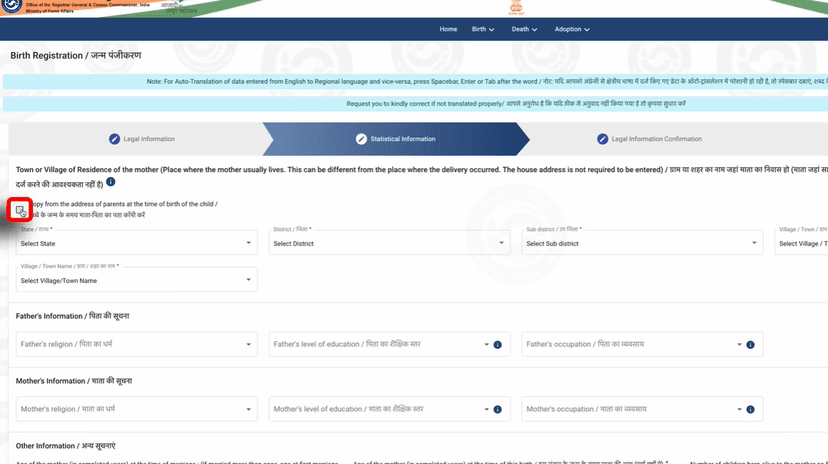
#Mother's Address
Tick Same as above to copy address
Or enter manually if different
#Parent Details
Enter for both parents:
- Religion
- Education Level
- Occupation
#Mother & Child Details
Enter Mother's age at marriage
Enter Mother's age at child's birth
Enter Number of children born alive to mother
#Delivery Details
Select/Enter:
- Delivery Place – Government/Private Hospital
- Method of Delivery – Normal/Surgical/Other
- Child's weight at birth
- Duration of pregnancy (in weeks)
Supporting Documents
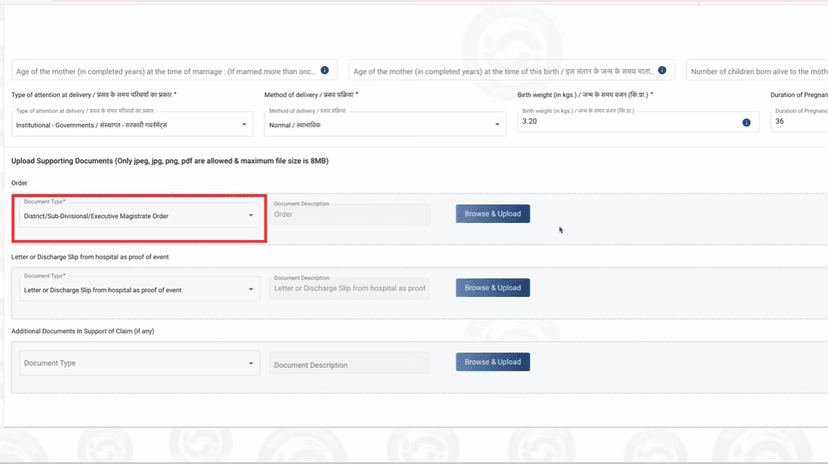
#Document Requirements
Based on registration timeline:
- Within 21 days – Minimal documents required
- Delayed registration – SDM Order required
#Upload Birth Proof
Upload Hospital Discharge Slip or Birth Letter
#Upload Reporting Form
Select Reporting Form under Document Type
Click Save Draft
Click Next
Confirmation & Payment
#Application Summary
Verify all details carefully:
Check:
- Child's Date of Birth
- Father's & Mother's Name
- Address and other info
Click Next
#Document Language
Select Document Language
Click Next
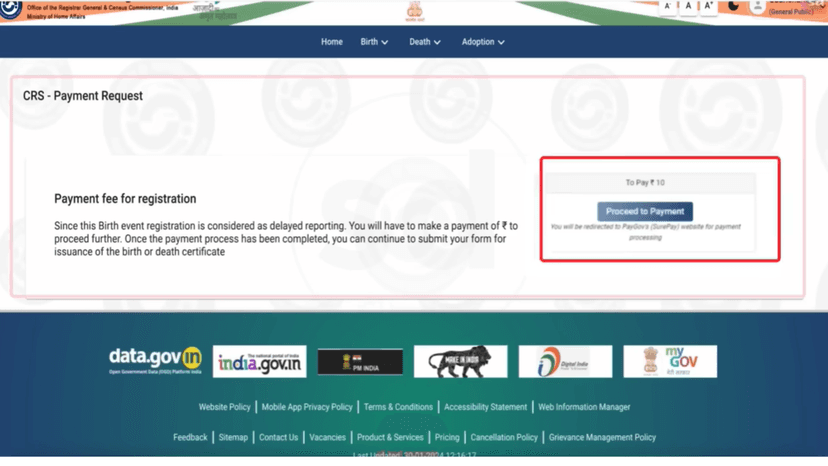
#Payment
Click Proceed to Payment
Complete the payment
Status will show Success
Download payment receipt
#After Submission
You will receive:
- Application Reference Number
- Download button when approved
- Birth Certificate on registered email
Done! Form Complete 🎉
Follow all the steps above and your form will be successfully submitted.
Apply Now